A clearer route to university IT and studio support.

Emily Carr University’s Service Desk is where students find guides and request help with accounts, equipment, and studio access.

Overview

The Service Desk is Emily Carr University’s online portal for IT and studio support. Students use it to find setup guides, look up services such as the fabrication shops and studios, and send requests to the support team. Workshop observations suggested that students valued staff help but were often unsure where to find it. I worked on it as a business analyst at the university from 2023 to 2024, connecting each guide and service to the right request so a stalled task leads straight to help.

Prototype recordingA tour of the portal home, from search to the support route. No audio.

What I did

UX research
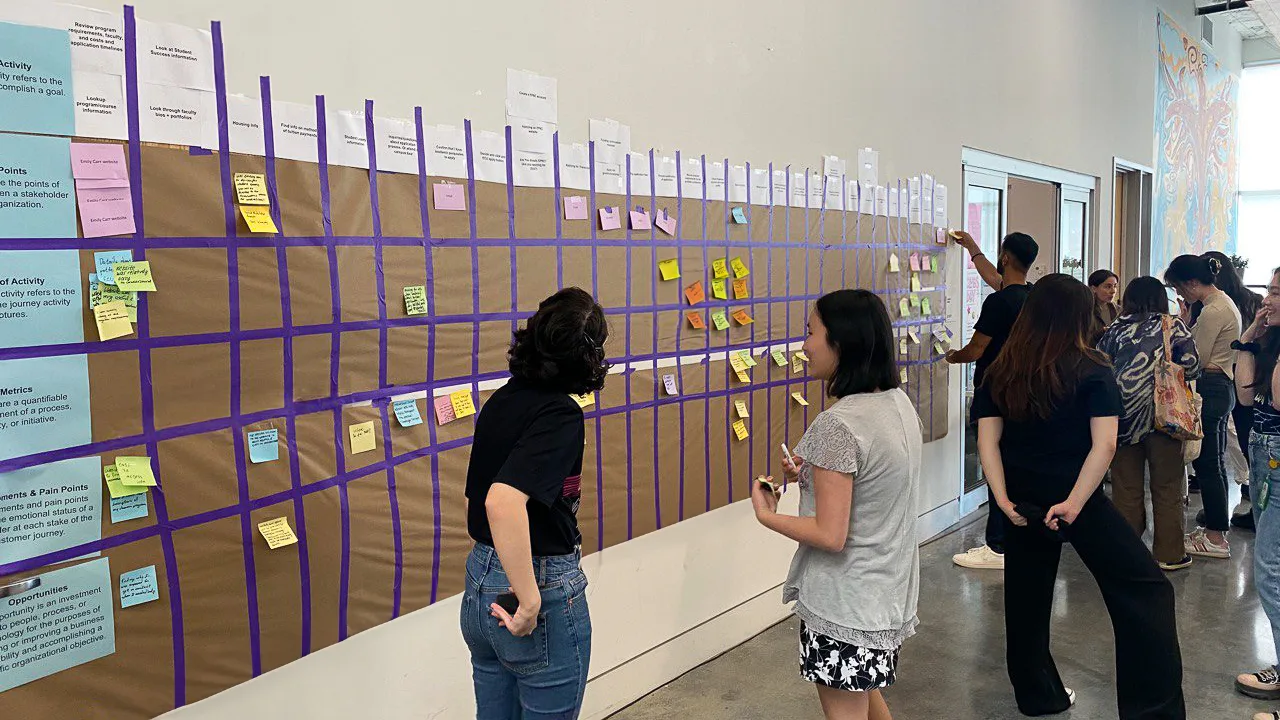
Drew on student experience-mapping workshops to build a persona and empathy map of students looking for help.
Structure & flows
Organized the portal into a knowledge base, service catalog, and request management, with a flow from two-factor authentication (2FA) guidance to a support request.
Interface design
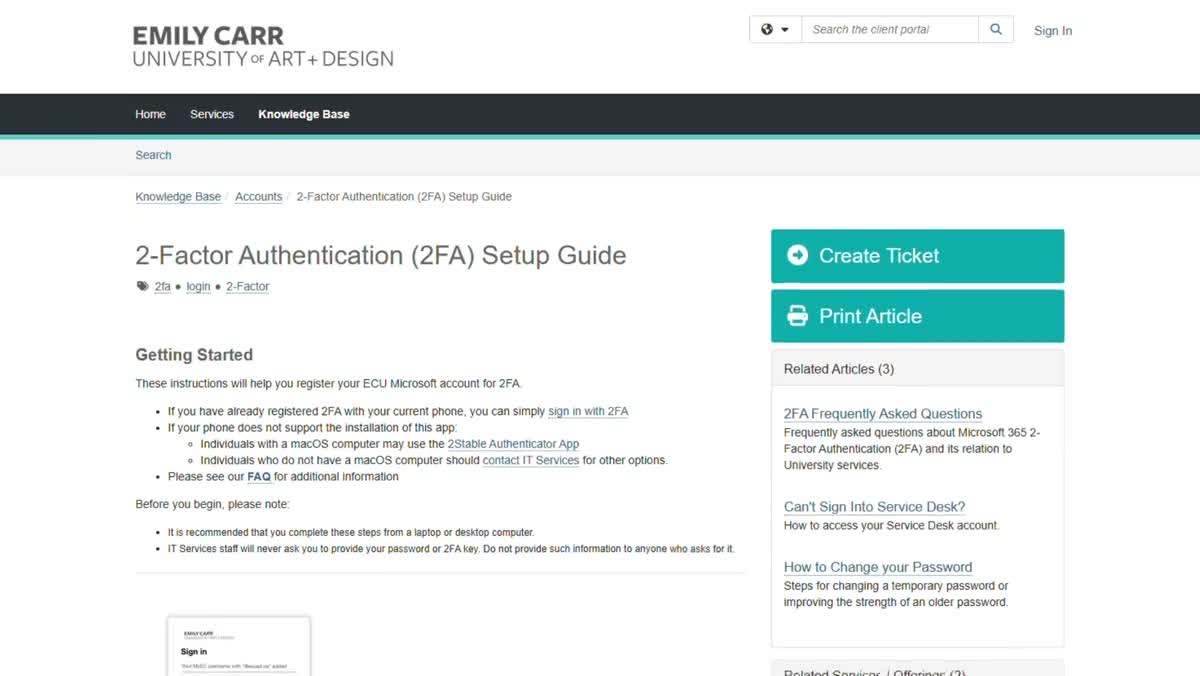
Redesigned the account guides so setup steps, a support action, and related guides sit on one page.
Interaction design
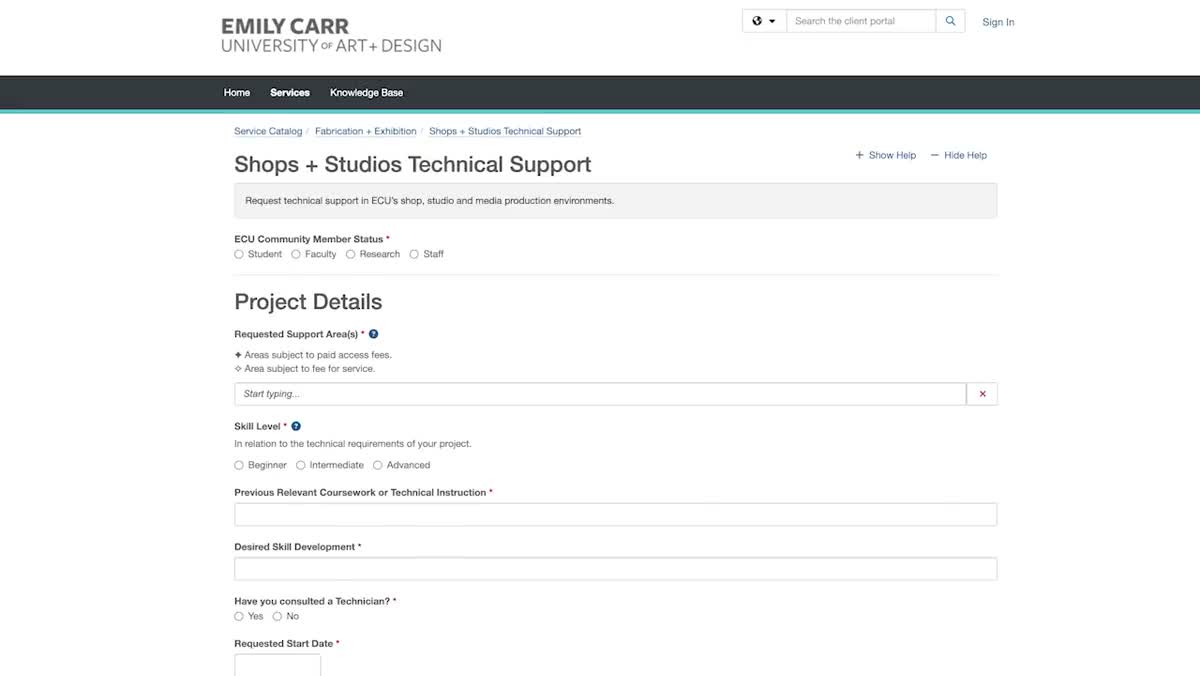
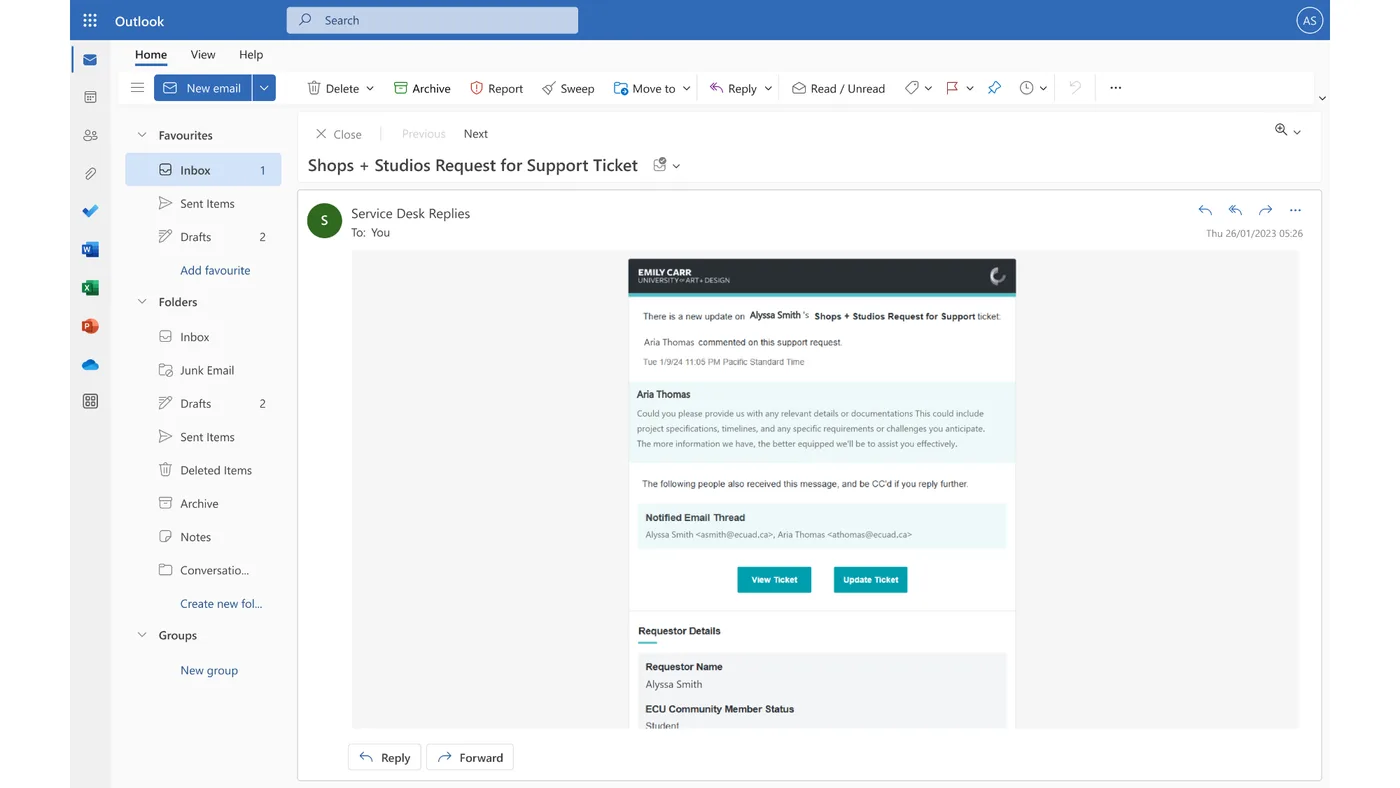
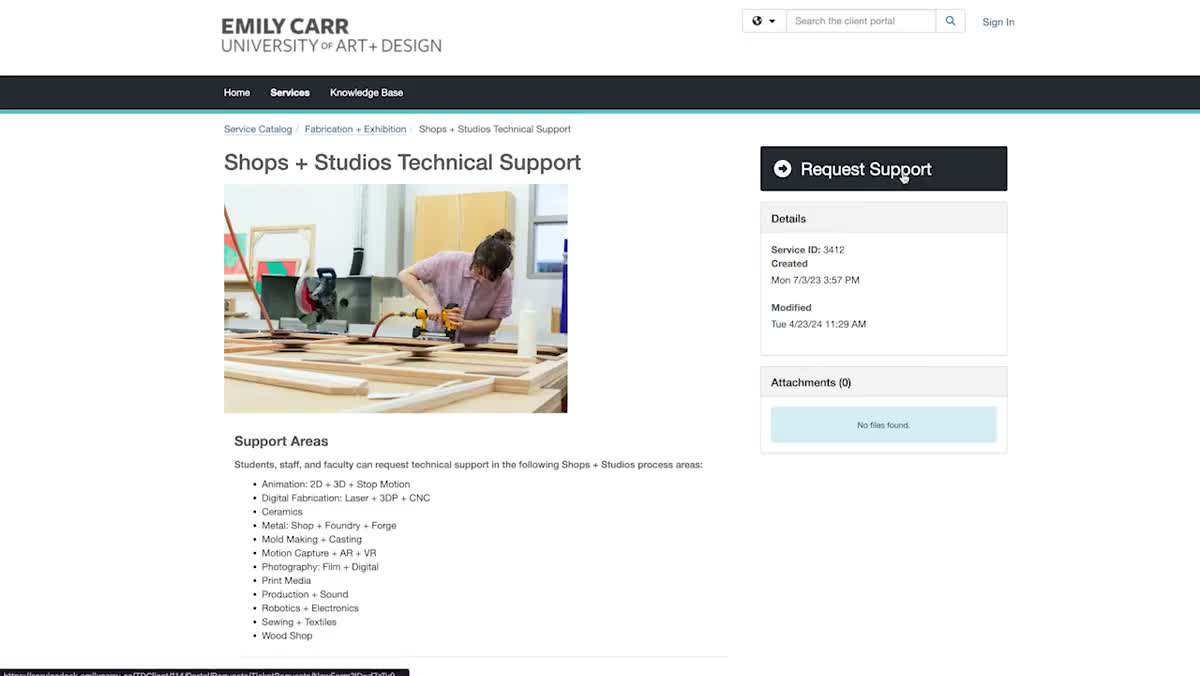
Designed the studio support route: finding a service, requesting help with project details, and replying when staff follow up.
Prototype
Built a working prototype of the portal home, from search to the support route.
Design system
Defined the colors, type, and reusable controls shared by guides, services, and request forms.

UX research

A proposed persona and empathy map explore how students find and use university support.

User persona

Student seeking help

University support · web portal

Goal
Resolve a problem and continue studying.
Barrier
Unfamiliar systems
Need
Find the right support route.

Empathy map

Says
Finds staff helpful.
Thinks
Where do I look?
Does
Navigates unfamiliar systems.
Feels
Unsure where to find help.

Based on workshop observations.

Students placing feedback on a wall-sized journey map

Experience mapping workshop

Students map their experience from application to enrollment.

Structure & flows

Site routes and a proposed support flow connect self-service guidance with help from the service team.

Sitemap

The sitemap separates guides, service information, and request management.

Selected site routes
Service Desk Home

Knowledge Base

2FA guide
Account request

Service Catalog

Shops + Studios
Studio request

Manage Requests

View My Tickets
Approvals

User flow

The flow connects 2FA guidance with a support request when setup stalls.

Start or endScreen or actionDecisionProposed path
Two-factor authentication support flowStart at account support and read the 2FA guide. If setup works, continue setup. If still stuck, create a ticket and complete the account request form.NOYESAccount supportSTARTRead the 2FA guideStillstuck?Continue setupENDCreate ticketAccount request formEND

Select a route to follow a student whose setup works or one who is still stuck.

Interface design

Account guidance connects setup instructions with a support request when students need more help.

Layout comparison

The 2FA guide keeps setup instructions, a support action, and related guides on one page.
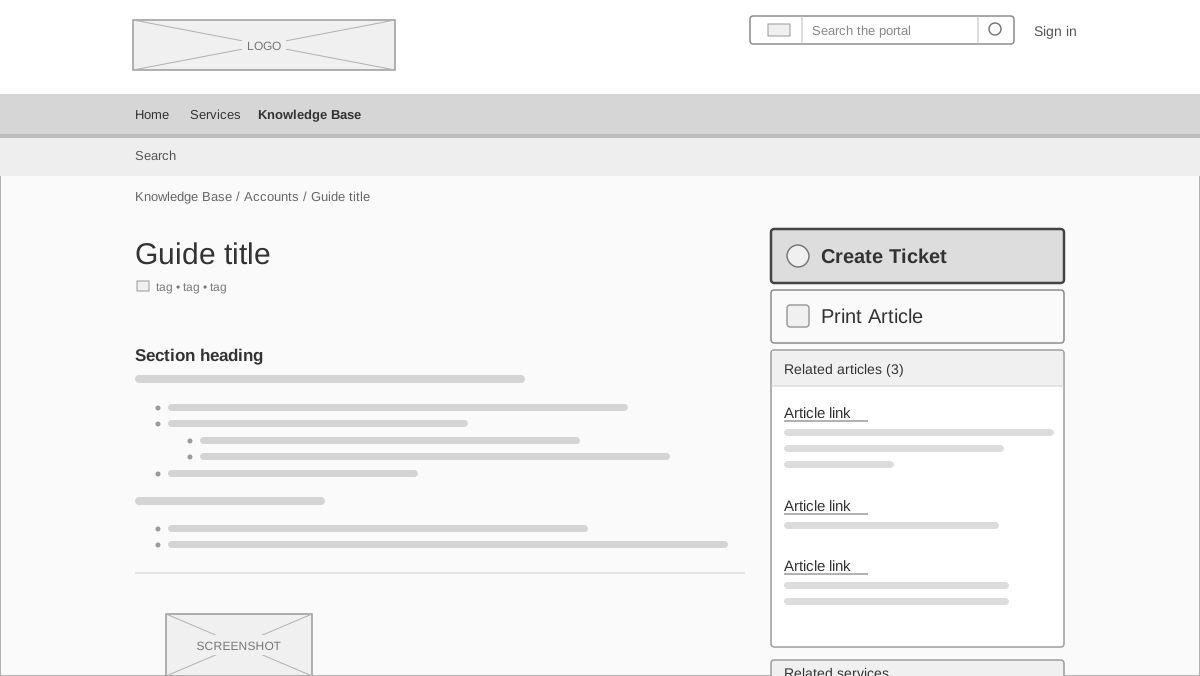
2FA SETUP GUIDE
2FA setup guide low-fidelity wireframe. Navigation above the guide title and instructions, with Create Ticket, Print Article, and related articles in a side column.
2FA setup guide with Create Ticket beside the instructions

Interaction design

Students find a studio service, request support with their project details, and follow up when staff reply.

  1. 1
    Fabrication + Exhibition
  2. 2
    Shops + Studios
  3. 3
    Request Support
  4. 4
    Project details

Support request flow

A studio support request can stall on unfamiliar service names, missing project details, and an update that doesn’t say where to reply.
01

Discover

Studio service page listing supported areas
Potential barrier

Unfamiliar service names

Design response

Named service areas

02

Request

Studio request form collecting project context
Potential barrier

Missing project details

Design response

Questions about the project

03

Follow up

Related studio email with a staff update and ticket actions
Potential barrier

Unclear where to reply

Design response

Visible reply action

Design system

Color, typography, and reusable controls connect the portal’s guides, services, and request forms.

Color palette

Portal teal#0EAFAA
Ink#293134
Surface#F5F5F5

Typography

AaArial · 16 / 24 / 36

Components

Primary actionRequest supportText fieldProject details
Next projectWeCare